
Buying a domain
You check a domain, and if its verified owner takes offers you can offer yourself, let your agent offer within limits, or set a private maximum and let a match happen. Every price you agree to is your own tap.
1. Check the domain
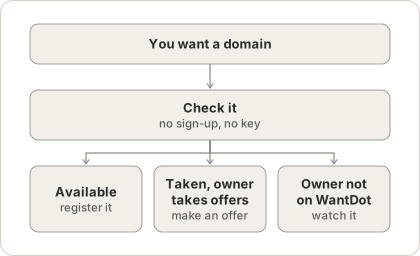
check_domain says whether the name is available, parked, in use, listed for sale or unclear. It reads public data only and does not contact the owner. If a verified owner on WantDot takes offers, it says so.
If the name is free, register it with any registrar. suggest_alternatives finds close names the registry confirms nobody owns.
2. Three ways to offer
Offer yourself. Give an amount in whole dollars and your email. We email you a button. Nothing reaches the owner until you press it. By pressing it you agree to the offer terms listed in that email.
Let your agent offer. Your agent asks for a mandate with request_mandate. We email you the limits: the most it may offer, how many offers, which domains, for how long. After you approve, your agent can offer, counter and withdraw inside those limits. Everything it sends is marked as from an AI agent, and it can never accept a deal or pay.
Watch with a private maximum. When you watch a domain you can add the most you would pay. No one ever sees it. If the owner’s price is at or below your maximum, the owner gets an offer on your behalf, at their public price or halfway between their price and your maximum. You confirm the maximum by email and can change it once a week.
If the owner has not claimed the domain, or does not take offers, you can still watch it. We email you when the owner claims it, lists it, changes the price or the registration nears expiry.
3. The owner answers
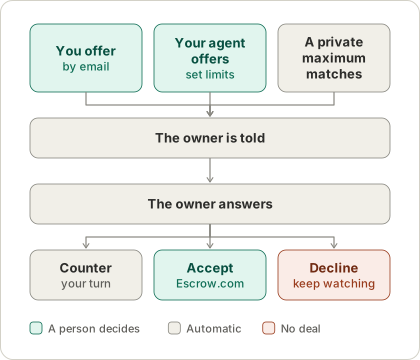
The owner gets your offer by email and answers on a private page. They can accept, counter or decline. If they counter, you get an email and your page shows the new amount: you can accept, counter again or withdraw.
Neither side ever sees the other’s email address. Notes lose links, email addresses and phone numbers.
If the owner’s agent has rules, it may answer for them. A counter or decline is sent automatically and is always marked as automated. A yes always waits for the owner.
4. If you agree
When either side accepts the other’s current amount, the deal is agreed. An Escrow.com transaction opens and you are emailed the link to agree to it. Paying needs a free Escrow.com account with an identity check, and you can ask us to set that account up when you offer. See The life of an offer.
You can offer on a domain up to three times in 30 days, and a limited number of times a day.