
Selling a domain
You prove you own the domain, say whether and at what price you would sell, and choose how offers are answered. Offers reach you by email, and every yes is yours.
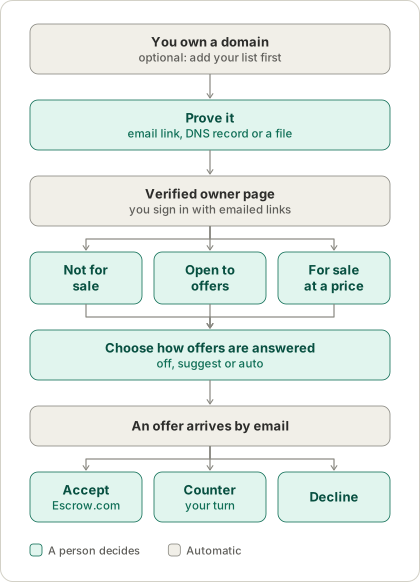
1. Prove you own it
You need to show control of the domain. There are three ways, and you pick the easiest for you:
- A link to the registration email. If the domain’s public record has an email address, we send a link there. One click. Many registrars show a privacy forwarding address, which works too.
- A DNS record. Add a TXT record we give you at
_wantdot.yourdomain. - A file. Put a small file we give you at
/.well-known/wantdot.txton the site.
There are no passwords. You sign in with a link sent to your email.
We never show who is on the registration record. Until you verify, nothing about the domain is listed as for sale, and nobody can make an offer through WantDot.
2. Say whether you would sell
On your verified page you choose one of three statuses:
If someone later registers the domain under a new owner, the claim ends and the listing is removed. We re-check every verified claim each day, and we tell you if it lapses.
3. Choose how offers are answered
This is optional. You can answer every offer yourself. Or you can set rules so an agent helps.
- Off. You get each offer by email and answer it yourself.
- Suggest. The agent works out what to do and shows it to you. You approve with one tap.
- Auto. The agent counters and declines on its own, always saying it is automated, and emails you what it did.
In every mode, a yes always waits for your tap. The rules are fixed numbers you chose, such as “decline below 40% of my price”, so a decision can always be explained. See How it works.
You can also connect your own agent with an agent token for one domain. It can read the offers and manage your rules and listing. It cannot answer an offer or accept a deal.
4. An offer arrives
You get an email with the amount and an optional note from the buyer. The buyer’s email address is never shown to you, and yours is never shown to them. Links, email addresses and phone numbers in a note are removed.
You answer on a private page that only your link opens. You can accept, counter or decline. Nothing is binding yet.
5. If you agree
When you accept, or the buyer accepts your counter, the deal is agreed. WantDot then opens an Escrow.com transaction and emails you both the link. See The life of an offer.